Read Info
Read device information before you start working, so you know exactly what is connected.
A model-based Android service tool and an AI boot log analyzer, working together so you can find the fault and fix it faster.
Choose the brand, pick the exact model from the list and run the operation you need. The operations shown depend on the selected brand and model.
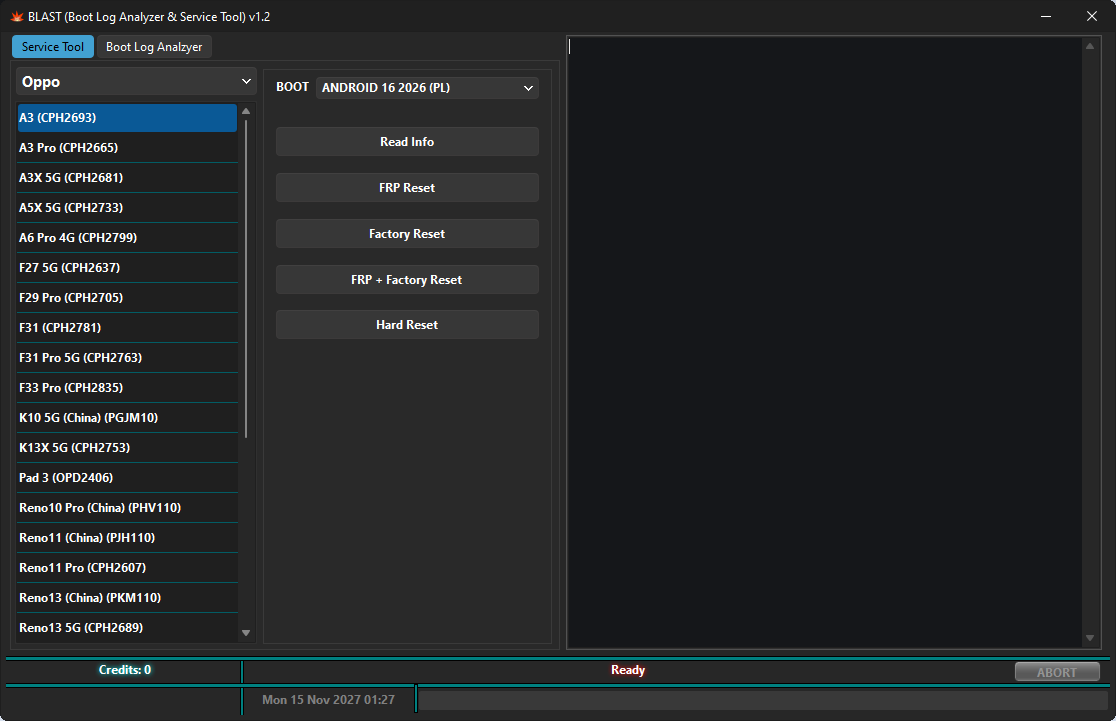
Available operations vary by model and chipset.
Read device information before you start working, so you know exactly what is connected.
Flash stock firmware to recover bricked, boot-looping or corrupted devices.
Remove Factory Reset Protection, alone or together with a factory reset.
Wipe user data and restore the device to a clean state.
Unlock the bootloader and patch bootloader security on supported models.
Back up partitions before risky work and keep a safe copy of important data.
Format userdata and erase selected areas when a clean start is needed.
Get devices that are stuck in fastboot mode back to a normal boot.
BLAST works across the chipsets found in most Android phones today.
Helio and Dimensity devices.
Snapdragon devices.
Unisoc (Spreadtrum) devices.
Exynos-based Samsung devices.
Supported brands
…and more brands with every update.
Capture the boot log while the device starts up, or load a saved log. BLAST analyzes it with AI and tells you what is wrong and how to fix it. Credits are used only for the AI analysis: one credit = one analysis.
Detects connected USB serial adapters so you can start listening with fewer clicks.
Records boot output in real time and keeps logs for later review.
Our AI reads the log and flags errors, failed services, kernel messages and suspicious boot stages.
Get possible causes for the failure along with suggested ways to resolve it.
Technician-friendly reports you can save or attach to job records.
Share a report with co-workers in a single click.
Plug in your USB serial adapter.
Start logging while the device boots.
Get a detailed analysis with possible issues and solutions.
Share the report with co-workers in one click.
Register, log in and reset your password right inside BLAST. Activate the Service Tool once through any authorized reseller, and add credits whenever you want AI boot log analysis.